- The device receives a private IP address
- The IP address is dynamic (it can change)
- Multiple devices share a small pool of public IPs
- Inbound connections from the internet are blocked
- Conserve IPv4 address space
- Improve scalability
- Enhance security by blocking unsolicited inbound traffic
- PLCs
- IP cameras
- Industrial controllers
- Web interfaces behind a cellular router
- CGNAT blocks inbound traffic
- Port forwarding on the router cannot bypass CGNAT
- The carrier does not know which shared device should receive the inbound packet
- A dedicated, routable public IPv4 address
- The same IP every time the device reconnects
- Inbound connections allowed
- Predictable firewall and routing behavior
- Remote device management
- SCADA / industrial polling
- VPN termination on the router
To determine whether a SIM is using a dynamic, private IP (behind CGNAT), you can compare the IP address assigned to the router with the IP address visible on the public internet.
On the router side, check the cellular IP address assigned by the mobile network. This is the IP the carrier provides directly to the device.
- On IR300 serial routers and CR202 routers, go to Status=>Network Connections. At Cellular session, the IP Address is assigned by the cellular network to the router.
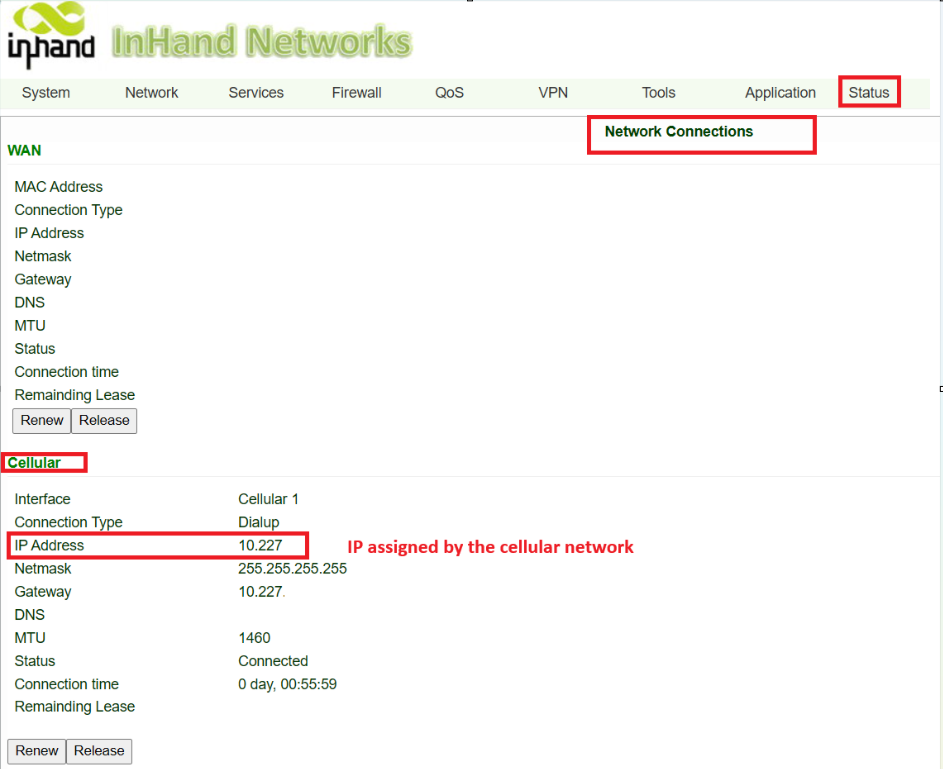
Then, from a computer connected behind the router, visit an external website such as whatismyip.com to view the public-facing IP address seen by the internet.
-
If the Cellular IP shown on the router and the public IP shown on the website are different, the SIM is operating behind NAT/CGNAT and is using a dynamic, private IP.
-
If both IP addresses match, the SIM is likely using a public IP, and inbound connectivity may be possible (subject to carrier policy and firewall rules).
- APN(Access Point Name). Please confirm with the carrier about the proper APN value for your SIM. Carriers may have different APNs for different plans. If it's a Verizon SIM, please refer to the article below: