I've
got a Verizon static SIM card, and I added APN manually to make it
work. Now I want to use this static IP to access my controller connected
to the IR615.
Port mapping/forwarding allows remote computers (for example, computers on the
Internet) to connect to a specific computer or service within a private local-area network
(LAN).
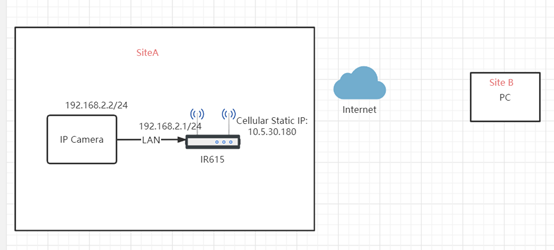
As the following show, any device which is capable of reaching internet can access the IP
camera on site A (192.168.2.2:80) via port mapping (10.5.30.180:8001).
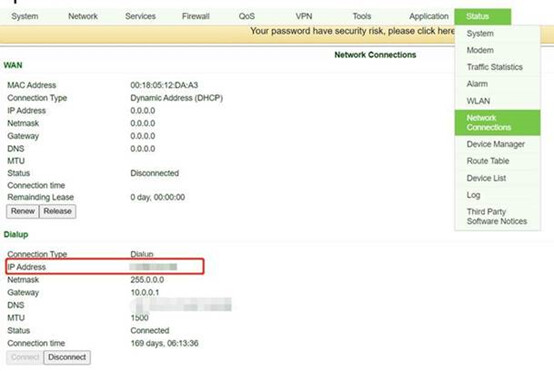
Here we configure the testing IR615 at site A.
After login to the Web UI, you can navigate to Status->Network Connections to check the
static IP of the device. The cellular Static IP of our testing IR615 is 10.5.30.180.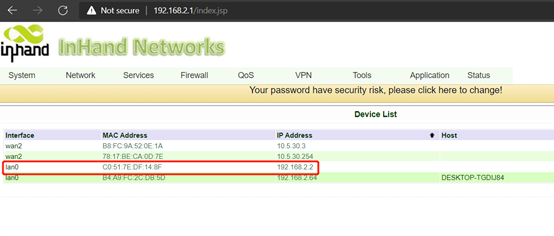
Then you can navigate to Status->Device List to check the connected devices and their
assigned IP addresses. The IP of our testing camera is 192.168.2.2.
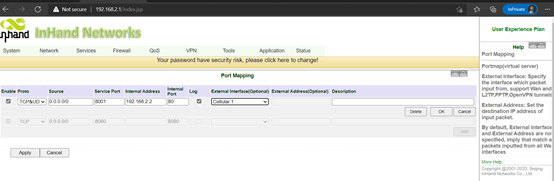
Firewall-> Port Mapping
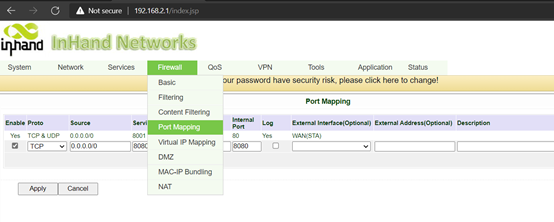
Source IP: 0.0.0.0/0 (allow any IP from the external port-Cellular 1)
Service port: the service ports opened on the router.
Internal Address: IP addresses of the lower end devices.
Internal ports: service port of the lower end devices.
For example, here is when any external address accesses port 8001 of 10.5.30.180 (assume
it is dial-up assignment), it actually accesses port 80 of 192.168.2.2 (lower side IP camera).
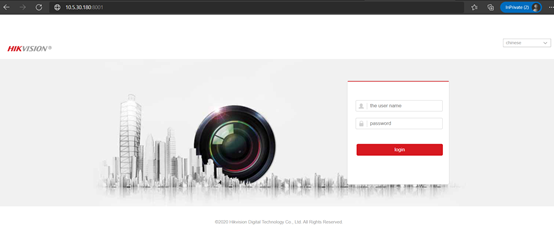
The PC at site B can enter 10.5.30.180:8001 to access the IP camara on site A.
how did you set up the TCP tunnel? I am new to this and cannot get the port forwarding to work either....
I found the above solution doesn't work, at least via T-Mobile.
What did work was creating a TCP tunnel via the InHand Device Manager web console in the 'Remote Manager' tab of the Gateway. Allowed me to get to the web console of my Algo SIP Horn