If you want to use your regular internet as your primary, and use cellular as backup when your primary is down, IR302/305 or CR202 Link backup function could help you switch the uplink automatically.
Note: Only CR202 with firmware V1.0.13 or later support this function. Please find latest firmware here: https://resources.inhand.com/EnterpriseNetwork/InPortableRouter/CR202
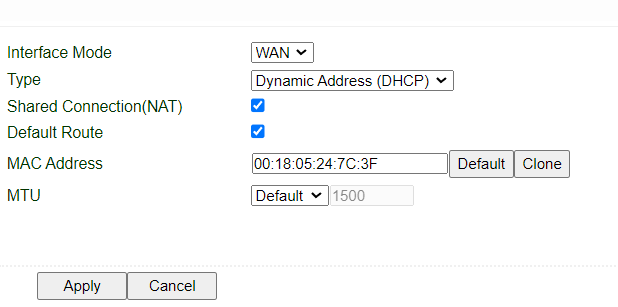
- By default, WAN/LAN port on IR302/CR202 is a LAN port, we need to change it to a WAN port first. Go to network>>WAN/LAN switch, change the settings to following:
- Connect your primary WAN to IR302's WAN/LAN port. Go to Status>>Network Connections to check if WAN interface is getting an IP address. Note: Please make sure IP addresses for WAN and LAN interfaces are in different subnets.
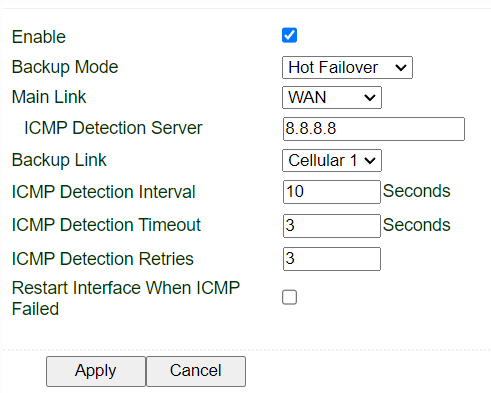
- Go to Network>>Link Backup, enable. Change the settings to following:
- All done. now all client devices on LAN2 and WiFi should be getting WAN as primary and cellular as secondary.